
No current Canadian evidence shows AI eliminating UX/UI design jobs, but the work and market are changing. Routine interface production is becoming faster and easier to automate. At the same time, the Canadian market is competitive, especially in Quebec and Ontario.
That does not mean UX/UI work is disappearing. The Government of Canada still projects positive employment growth for the broad occupation that includes UX designers. The harder truth is that more people are expected to seek work in this category than the number of openings available through 2033.
The most realistic forecast is therefore not “AI will replace every UX designer” or “UX is completely safe.” It is this: designers who offer only screen production will face more pressure, while designers who can define problems, understand users, organize complex systems, test decisions and take responsibility for the final experience will remain valuable.
Canada’s UX/UI outlook at a glance
- Canada does not publish a separate national forecast for UX/UI designers.
- “User experience designer” is grouped under NOC 52120: Graphic designers and illustrators, which covers many different creative occupations. Every opening, job-seeker and employment-growth figure below applies to that broad group and is not UX/UI-only data.
- For that broad group, the federal government projects 28,500 job openings and 43,700 job seekers from 2024 to 2033.
- The same forecast still expects 1.2% average annual employment growth, equal to the projected national average for all occupations.
- Job Bank rates the 2025–2027 outlook as very limited in Quebec and Ontario and limited in most other provinces.
- Statistics Canada has not found clear evidence that AI exposure caused a persistent employment decline between November 2022 and December 2025.
- AI adoption is accelerating, so the tasks inside UX/UI roles are likely to change even if the profession does not disappear.
These points describe a profession under pressure and transformation—not one approaching extinction.
Why Canada’s official data does not measure UX/UI separately
Before interpreting the numbers, it is important to understand how Canada classifies the work.
The federal National Occupational Classification profile for NOC 52120 includes “user experience designer,” but the group is called Graphic designers and illustrators. It also includes graphic designers, illustrators, animators, motion designers, game designers and other creative roles.
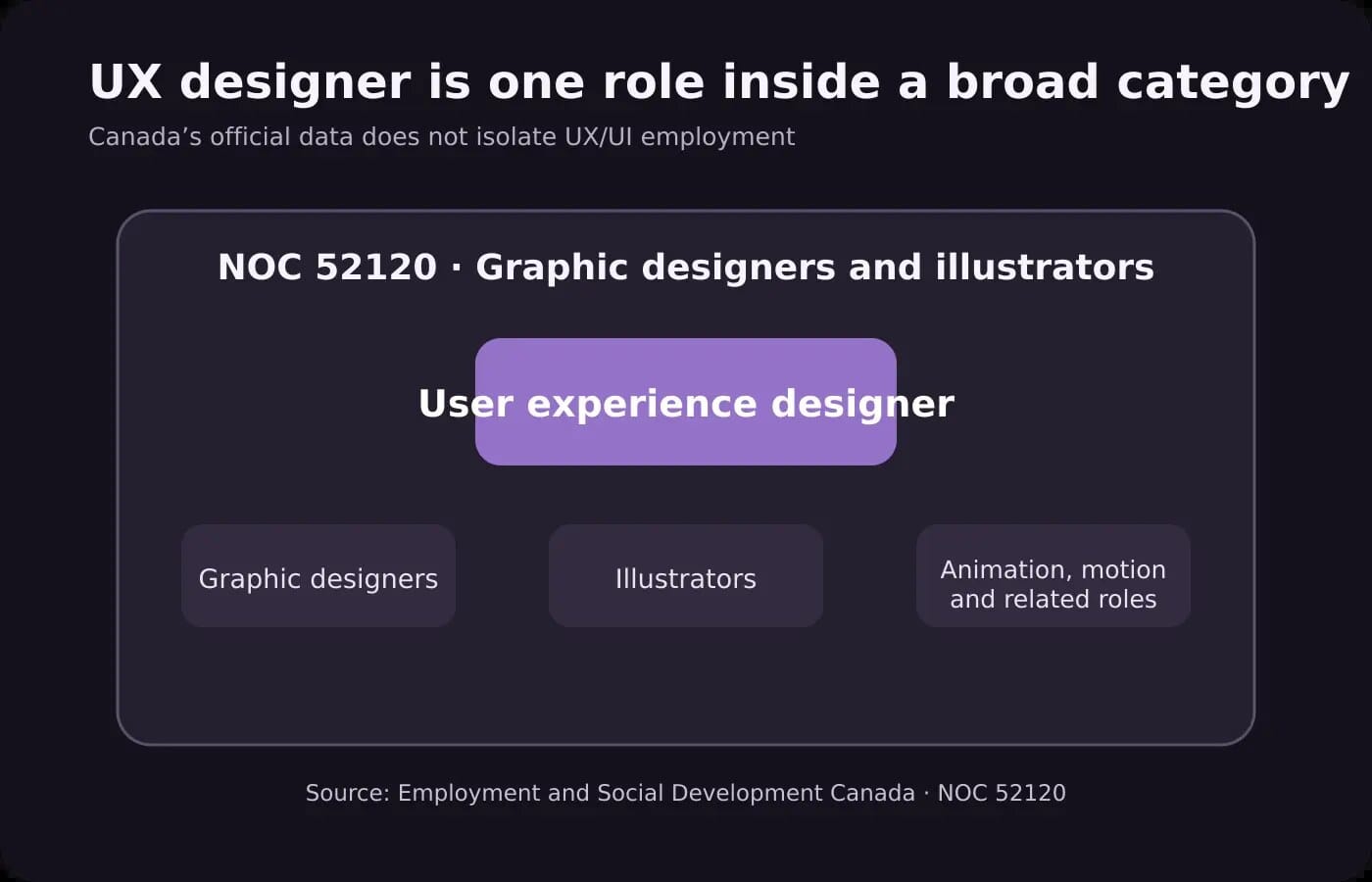
This creates a major limitation. The wages, employment figures and forecasts published under NOC 52120 do not isolate UX researchers, product designers, interface designers or design-system specialists. A weak outlook for the whole group cannot be treated as proof that UX/UI demand is falling at the same rate.
The mix matters because the group contains work facing different market forces. Job Bank’s British Columbia regional outlook notes that traditional print demand is weakening while digital marketing, e-commerce, e-learning and social media continue to support demand—particularly for UX and UI designers. In other words, the broad category is under pressure, but some digital specializations may perform differently from the group average.
What the 2025–2027 job outlook means
Job Bank’s national outlook for NOC 52120, updated December 10, 2025, rates the near-term prospects as very limited in Quebec and Ontario, limited in most other provinces, and moderate in Saskatchewan and Yukon.
For designers in Montreal, the regional outlook is also rated very limited for 2025–2027.
This is significant, but “very limited” does not mean there are no jobs. It means job seekers should expect strong competition relative to available opportunities. It also describes the entire NOC group, not UX/UI alone.
For a designer, the practical message is that a general portfolio may struggle. Employers and clients need clear evidence that you can solve a specific type of problem: simplifying an enterprise dashboard, improving a conversion flow, designing accessible interfaces, organizing a responsive system or turning research into product decisions.
The market is less forgiving of portfolios that show attractive screens without explaining the reasoning, constraints or outcome.
The forecast through 2033 predicts a surplus—not disappearance
The Canadian Occupational Projection System classifies NOC 52120 as having a strong risk of labour surplus from 2024 to 2033. Its projection summary, modified January 30, 2025, estimates:
- 28,500 job openings over the ten-year period
- 43,700 job seekers entering or moving into the occupation
- 93,200 people employed in the group in 2023
- 1.2% average annual employment growth, matching the projected average for all occupations
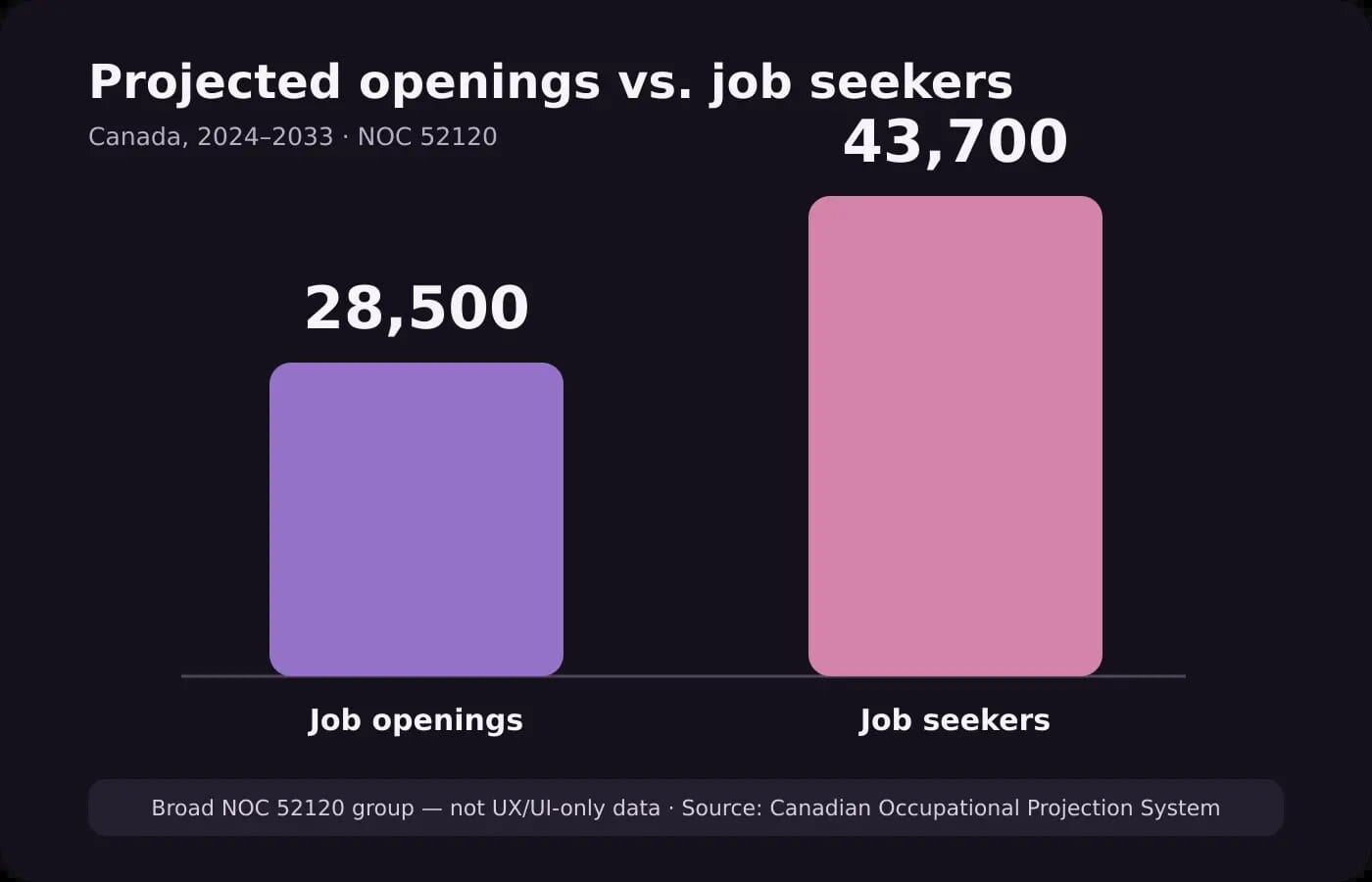
The gap between seekers and openings is the warning. More qualified people are expected to compete for each opportunity.
But the positive employment-growth forecast is equally important. If the government expected the occupation to vanish, it would not project continued growth or thousands of openings created through expansion and replacement needs.
The responsible interpretation is that Canada expects an oversupplied creative labour market, not the end of design work. Designers may need longer job searches, stronger specialization and a clearer commercial case for their contribution.
Is AI already eliminating Canadian design jobs?
Current Canadian data does not prove that it is.
A January 2026 Statistics Canada study of employment trends in the generative-AI era found no clear evidence of a persistent employment decline in occupations considered highly exposed to AI but less complementary with it between November 2022 and December 2025. Employment generally grew across the AI-exposure groups examined.
The researchers also warned that several forces were affecting the labour market at the same time, including post-pandemic adjustments, demographic change and trade conditions. They could not attribute recent employment patterns to AI alone.
That distinction matters. Canada’s projected labour surplus began from broader supply-and-demand conditions. The official forecast does not say that AI caused the surplus.
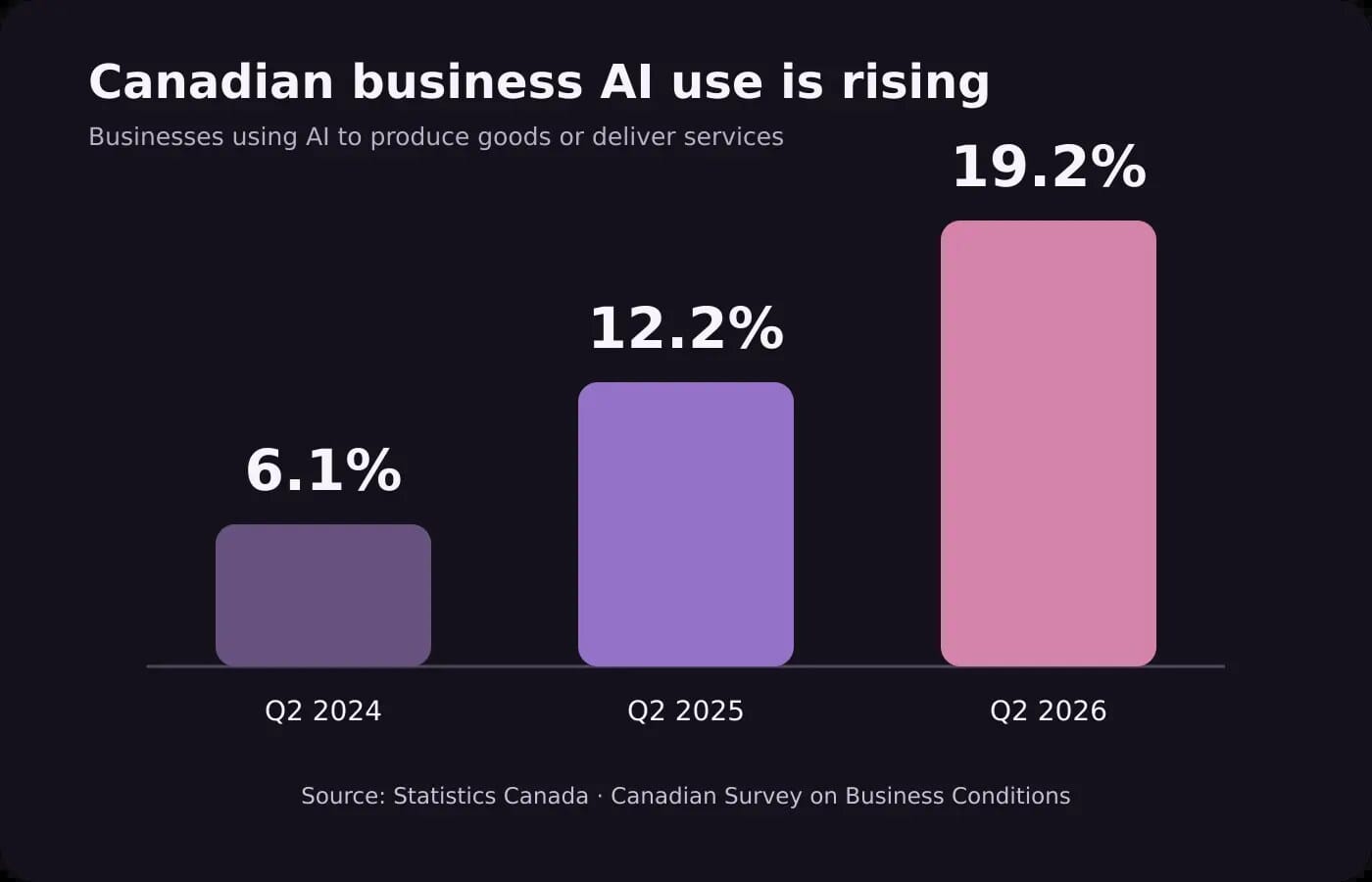
At the same time, AI adoption is no longer marginal:
- In the second quarter of 2026, 19.2% of Canadian businesses reported using AI to produce goods or deliver services, compared with 12.2% in 2025 and 6.1% in 2024.
- Adoption reached 32.4% among businesses in professional, scientific and technical services.
- In March 2026, 35.9% of Canadian workers reported using generative AI at work during the previous 12 months.
- Among those users, only 11.6% used it for most or nearly all tasks. Most used it for some tasks rather than across their entire job.
Earlier business data offers another useful caution. In the second quarter of 2025, 89.4% of businesses using AI reported no change in employment after implementation. That does not guarantee future stability, but it does show why “AI use” and “job replacement” should not be treated as the same measure.
The data points to task transformation happening faster than whole-job elimination.
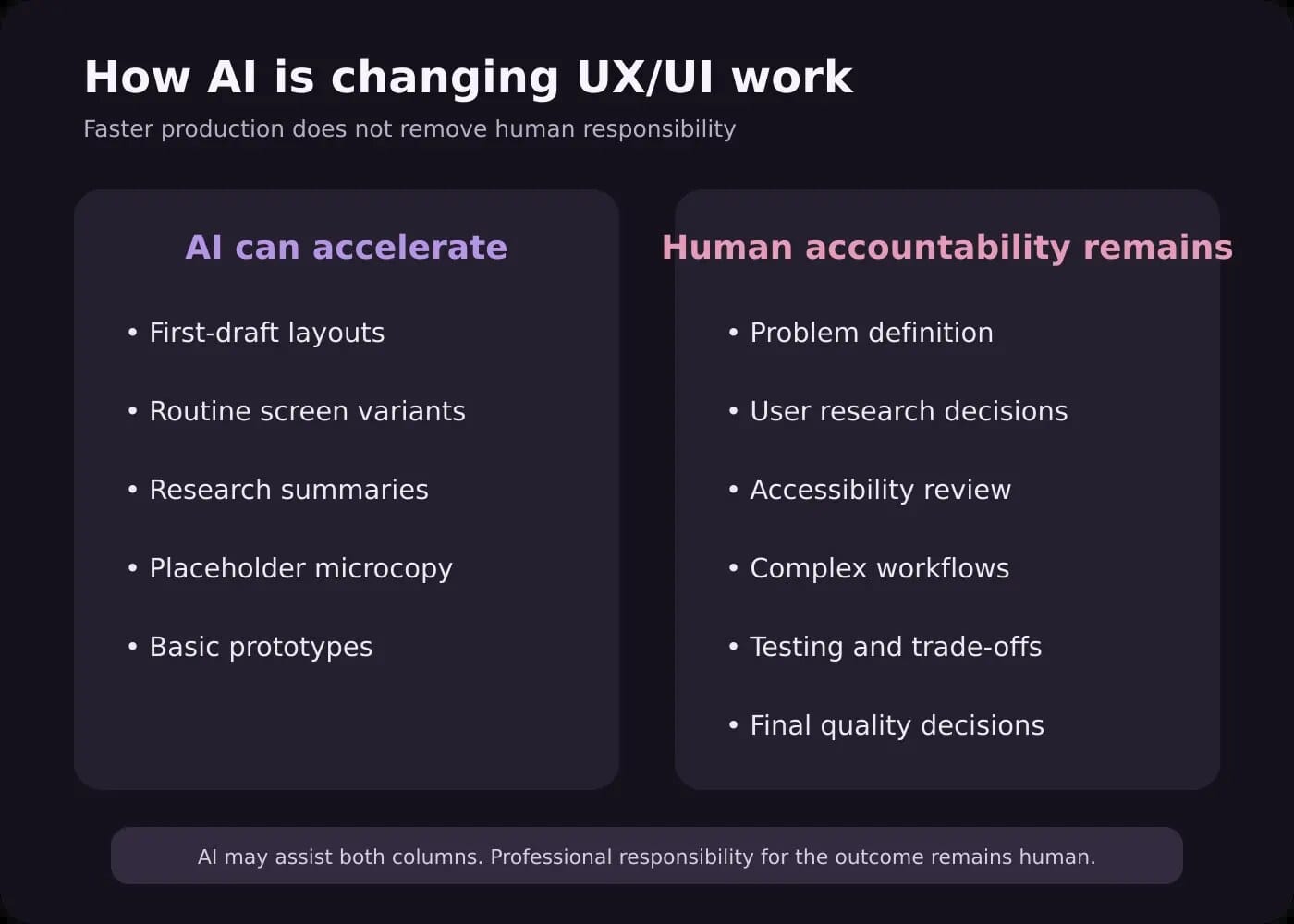
UX/UI work under the most pressure
AI tools can already accelerate or partially automate several production activities. The greatest pressure is likely to fall on work that is repeatable, easy to evaluate visually and disconnected from deeper product context.
Examples include:
- Producing first-draft layouts from a detailed prompt
- Generating common landing-page sections
- Creating routine screen variants
- Applying simple style changes across many frames
- Drafting placeholder microcopy
- Summarizing research notes
- Converting clear requirements into basic prototypes
- Recreating familiar interface patterns
This does not mean these activities no longer require review. It means that selling them as the complete value of UX/UI design will become harder. A client may reasonably expect faster delivery when software can produce an acceptable starting point in minutes.
Junior roles may feel this pressure most sharply because many entry-level assignments have traditionally involved production and documentation. Statistics Canada’s economy-wide research found weaker employment growth among younger workers than among workers aged 30 to 49 across all AI-exposure groups, although the differences were not specific to UX/UI or proven to be caused by AI.
The higher-value work that remains
Interfaces are visible, but much of the value in UX happens before and after the screen is drawn.
AI can generate options. It cannot independently accept responsibility for whether a product solves the correct problem, protects users, supports the business or works in the messy conditions of real life.
Higher-value UX/UI work includes:
Defining the right problem
Stakeholders often arrive with a requested feature rather than a verified user need. A strong designer investigates the goal, challenges assumptions and decides what should be designed before choosing how it should look.
Research and interpretation
AI can summarize notes, but research quality depends on whom you speak to, what you ask, how you recognize bias and whether the evidence actually supports a decision.
Complex workflows and information architecture
Enterprise dashboards, account systems and multi-step services require hierarchy, state management, permissions and error handling. My FlexPortal dashboard UX/UI case study shows this kind of work: organizing account activity, FlexPoints, expirations and services into a clear interface supported by a consistent design system.
Accessibility and responsive behaviour
A generated desktop screen is not proof that an experience works with keyboards, assistive technology, smaller screens, zoom, long content or error states. Designers must define, test and document those conditions.
Trust, content and brand alignment
The right interface for a cybersecurity company is not just a collection of standard components. It needs to communicate credibility and make complex services understandable. In the Cybertivity website UX/UI project, the work included a cohesive three-page system, responsive layouts, clear hierarchy and a visual direction suited to the company’s audience.
Facilitation and accountability
Products involve conflicting goals, limited budgets and incomplete information. Someone must guide decisions, explain trade-offs, collect feedback and stand behind the final recommendation. That responsibility remains human even when AI assists the process.
What UX/UI designers in Canada should do next
The response to a crowded market is not to compete with AI at producing the highest number of screens. It is to become more useful around the parts of the process that determine whether those screens succeed.
1. Show decisions, not only deliverables
In each case study, explain the problem, the evidence you used, the alternatives you considered and why the final direction was chosen. Include responsive states, edge cases and constraints when they are relevant.
2. Develop a defensible specialization
Choose an area where context matters: SaaS dashboards, accessibility, e-commerce, healthcare, public services, design systems, conversion-focused websites or bilingual experiences. Specialization makes it easier for an employer or client to understand why your experience fits the problem.
3. Learn to direct and verify AI-assisted work
Designers should understand what AI can accelerate, where it fails and how to review the output. This includes checking accessibility, content accuracy, component consistency, responsive behaviour, privacy and implementation quality.
If you are looking for practical ways to turn that capability into paid services, read How UX/UI Designers Can Make Money with AI Tools. That article focuses on service opportunities; this one focuses on the Canadian labour outlook.
4. Strengthen business and communication skills
The ability to connect design decisions to risk, revenue, support volume, usability or operational efficiency makes your work easier to defend. Facilitation and clear communication also become more valuable as teams use more automated tools.
5. Keep evidence of real collaboration
Document how you worked with developers, clients, researchers or stakeholders. A polished mockup can be generated. Evidence that you managed feedback, resolved constraints and delivered a coherent system is harder to imitate.
What businesses should expect from a UX/UI designer in the AI era
Businesses can use AI to explore ideas faster, but speed does not remove the need for professional judgment.
A capable UX/UI partner should be able to:
- Clarify the business and user problem before producing screens
- Decide where AI can safely reduce production time
- Review generated output instead of accepting it automatically
- Build coherent components and responsive patterns
- Address accessibility, content, edge cases and error states
- Work effectively with developers
- Explain the reasoning behind important decisions
- Take responsibility for the quality of the final experience
The best commercial result is not “human versus AI.” It is a skilled designer using efficient tools while remaining accountable for research, clarity and quality.
Will UX/UI jobs disappear in Canada?
No current Canadian evidence supports that conclusion.
The outlook is challenging: the broad occupational group containing UX designers has a strong projected surplus, and near-term prospects are very limited in Quebec, Ontario and Montreal. Designers should take that competition seriously.
But the same federal forecast includes positive employment growth and 28,500 openings through 2033. Statistics Canada’s early evidence also does not show a persistent employment collapse in AI-exposed occupations.
UX/UI jobs are more likely to change than disappear. Routine production will become less valuable on its own. Research, problem definition, systems thinking, accessibility, validation and accountable decision-making will matter more.
For designers, the goal is not to prove that humans can draw screens faster than software. It is to demonstrate the judgment that turns faster production into a product people can understand, trust and use.
Need UX/UI expertise for an AI-assisted design process?
I use modern tools to work efficiently while keeping research, responsive behaviour, accessibility and final design quality under professional review. Explore my UX/UI design services or tell me about your product.
FAQ
Is UX/UI design still a good career in Canada?
It can still be a viable career, but the market is competitive. Canada’s forecast for the broad NOC 52120 group shows positive employment growth alongside substantially more projected job seekers than openings. Designers need stronger specialization, evidence-based portfolios and the ability to work effectively with AI-assisted tools.
Does Canada track UX/UI designers as a separate occupation?
No. “User experience designer” is included within NOC 52120, Graphic designers and illustrators. The official figures therefore combine UX designers with many other creative occupations and should not be presented as UX/UI-only data.
Is AI responsible for the weak UX/UI job market?
That has not been proven. AI may be changing tasks and employer expectations, but Canadian researchers caution that employment patterns are also affected by post-pandemic adjustments, demographics and other economic factors. The official occupational forecast does not identify AI as the cause of the projected surplus.
Which UX/UI tasks are most likely to be automated?
Routine first drafts, common layouts, simple variants, placeholder copy and basic prototypes face the most pressure. Work involving research, complex systems, accessibility, facilitation, testing and accountability is harder to automate as a complete service.
Should UX/UI designers learn AI tools?
Yes, but learning tools is only part of the answer. Designers also need to know how to direct the work, protect sensitive information, evaluate the output and connect faster production to a useful business and user outcome.